
The tedium of board work —
hand it to a butler that answers by voice.
Ask “What should I do today?” and it reads out the cases with looming deadlines and your next step. Bylaw questions are answered instantly, with the articles cited. General-meeting tallies take one button; Kurasel deposits and withdrawals are journaled automatically. A serving Board Chair built this association cloud “to make my own life easier,” and keeps growing it while using it every day for his own association.
On the right is a demo that recreates actual concierge responses. Press “Listen” to hear the answer read aloud by your browser's voice (the live app uses natural neural voices).
In the real app you can talk to it with your microphone (works on iPhone Safari). The live app reads aloud with Google Cloud Text-to-Speech.
A PIONEERING APPROACH — one developer, with AI as the team
The work of “6 engineers, 2 years, ¥100M” —
with AI as the team, one person, five months.
311,000 lines, 360 PRs, 5,970 tests. A full-stack SaaS that runs an entire condominium association, built to production not by a vendor but by a serving board chairman with his own hands. How it was built, and what it would cost the conventional way, all in numbers measured from the repository.
That “what a hassle” feeling is right.
He became Board Chair by drawing lots, knowing nothing about bylaws or general meetings. Watch the roughly 12-second video on how KUMIAI CLOUD grew out of that burden.
DIAGNOSIS
Your association's “abandonment risk” in 60 seconds.
Just tap through eight questions. This quick self-check estimates whether your association looks “unprofitable” to a management company.
* This is a simple self-check based on general trends. It does not guarantee or predict whether any specific association's contract will be renewed or terminated. For a formal assessment, consult a management company, a certified condominium manager or another specialist.
The hassle starts the day you join the board.
Your Sundays disappear
Board meetings and general meetings fall on weekends. It is volunteer work, yet the responsibility is heavy.
The phone never stops ringing
“Can I keep a pet?” “What about bike parking?” — things an email should settle never get settled.
You have never read the bylaws
You are an amateur in buildings, law and plumbing — yet you are expected to decide.
General meetings go nowhere
Everyone talks, the discussion derails, and the tallying and minutes take you past midnight.
Why people decline board roles: “It's a hassle” 18.2%, “I don't know what to do” 13.6% (source: Ministry of Land, Infrastructure, Transport and Tourism, FY2018 Comprehensive Survey of Condominiums). So instead of enduring it, we solve it with AI and good workflows.
AI RULES BOT — recreating how the real feature works
Reading the bylaws is now the AI's job.
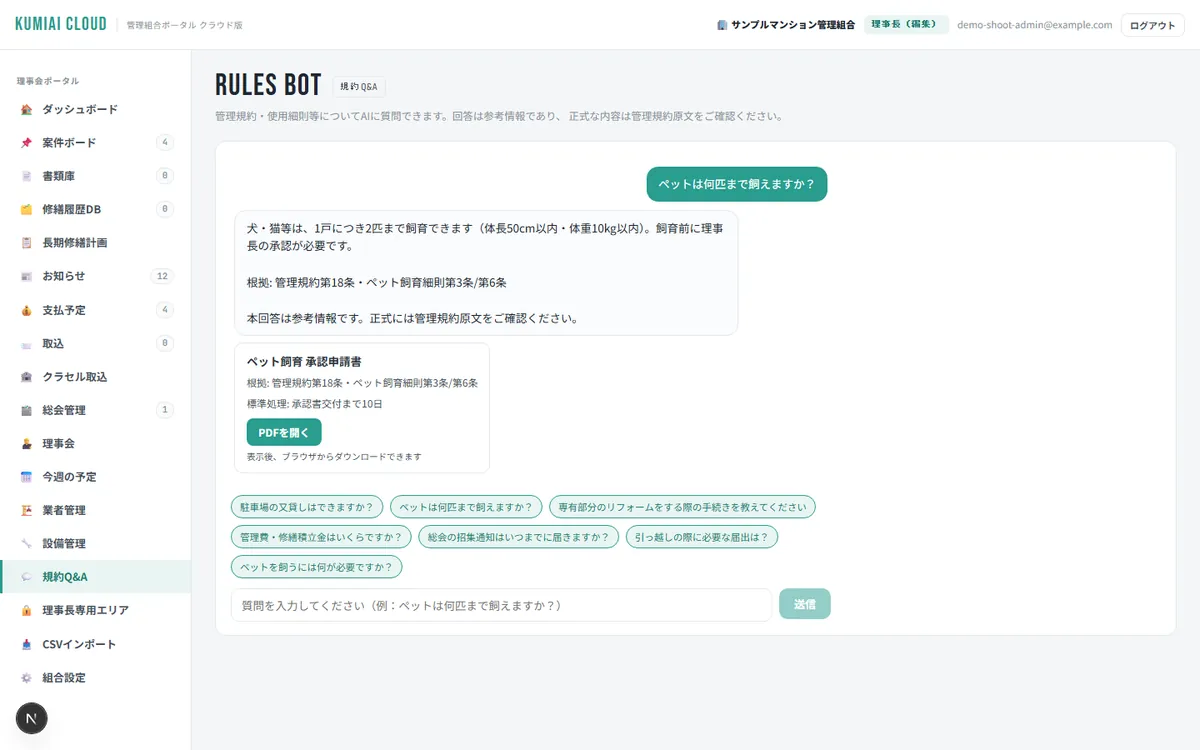
“How many pets?” “Can I sublet my parking space?” — the AI answers residents' questions instantly, citing the bylaws and usage rules. It even brings up the PDF of the application form you need. The Chair's phone stops ringing.
- Never off, 24/7/365
Late at night or on Sunday, the AI handles first-line questions for the board.
- Answers cite the articles
It shows “Bylaws Art. 18 · Rules Art. 3,” so residents are convinced.
- One stop, right down to the forms
Beyond the answer, it points you to the PDF of the notice or form you need.
- Same answer by voice
Talk to the concierge at the bottom right and the same bylaws AI answers on the same grounds.
* AI answers are for reference only. Formal decisions follow the original bylaws and the board's resolutions. Article numbers in the demo are samples.
Here is how a Board Chair's day changes.
Every feature here runs in production. The board may meet once a month, but association work arrives every day. AI and workflows get ahead of that daily work.
“Today's briefing” on the dashboard
Today's schedule, overdue cases, how many vendor emails arrived yesterday and the health of the Gmail link — all on one screen. The home screen offers four views (Simple / Timeline / Year / Detailed) and four designs; in “Detailed” you can freely rearrange and resize the cards.
Talk to your phone
“What's on today?”
It answers from real data — cases, schedule and equipment register — and suggests your next step. Read aloud in a natural voice.
The AI handles residents' questions first
“Can I sublet my parking space?”
Because the bylaws and rules are digitized, it answers down to the article number.
Vendor emails are imported automatically
Vendor emails in Gmail are fetched automatically every day. Attached quotes and invoices go to the document library in one click. For cases where a report never arrives, a reminder email is drafted automatically (a person sends it).
Kurasel transactions journaled automatically from a dictionary
Just upload Kurasel's income-and-expense PDF to import eleven months at once. The account and fund (general / repair reserve / taxable) are determined automatically from the description and the payer name, and only the undecided items are left for review. If a month is still unrecorded, the dashboard and the concierge tell you.
Vendors get their own portal
Each vendor logs in with its own passcode and sees only the schedule, documents and messages addressed to it; exchanges stay in a chat-style message board. Both sides confirm the scope, schedule and site photos, with read receipts. No more giving vendors the Chair's mobile number or returning calls.
Three pillars no other tool has.
Other tools share board information. KUMIAI CLOUD is different because the AI takes on the reading, the judging and the doing.
A butler that answers by voice Live
KUMIAI Concierge
It sits at the bottom right of every screen. Talk to it and it reads real data on cases, schedules, payments and accounts, answers, and takes you to the screen you need. Standard questions are answered in 0.1 seconds; everything else gets a grounded answer from the AI.
- Read aloud in a natural voice (Google Neural2)
- Say “leak” and it jumps straight to that case
- Answers “Anything unrecorded?” and “Anything unpaid?” from the accounts
- Works with microphone input on iPhone Safari
The AI proposes; a person decides. It never sends, spends or signs on its own.
Reading the bylaws is the AI's job Live
Bylaws AI
The bylaws and usage rules are digitized and built in. “How many pets?” “A storage shed on the balcony?” — it answers with article numbers and points you to the application PDF on the spot. 24/7/365, the Chair's phone stays quiet.
- Every answer cites the articles
- One stop, right down to the application PDF
- We digitize your bylaws for you at onboarding
- Answers are for reference; the board decides formally (with a disclaimer)
Keep your accounting software Live
Automatic journal entries for Kurasel
If you use the association accounting service “Kurasel,” keep your accounting as it is. Import the income-and-expense PDF and a journal dictionary (description × payer name × amount) determines the account and the fund (general / repair reserve / taxable). Anything ambiguous is never left to the machine — it goes to “needs review.”
- Eleven months imported from one PDF (actual result)
- Half-width / full-width kana variations normalized automatically
- Unrecorded months flagged on the dashboard
- Input guide for Kurasel generated automatically In development
NEW — features added October–November 2026
In the past month, the Chair's manual work shrank again.
A serving Board Chair grows it while using it every day for his own association, so features are added every week. Here are the main ones that went into production in October and November.
Home screen Live
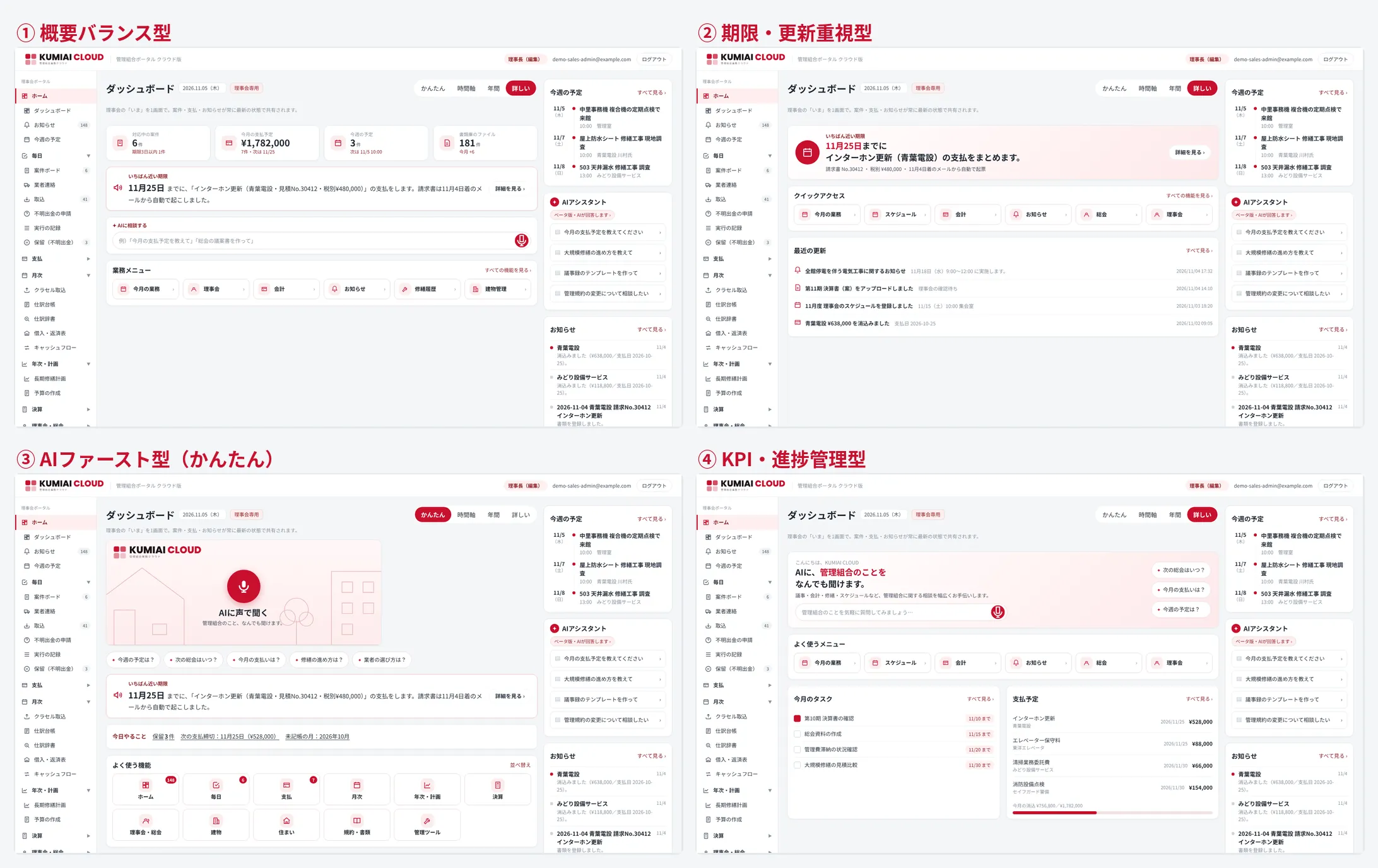
Simple / Timeline / Year / Detailed — and four designs
The moment you open it: “Ask the AI by voice.” Switch with one tap between “Simple” (nearest deadline and today's tasks up top), “Timeline” (deadlines on a band), “Year” (the whole year at a glance) and “Detailed” (counts and cards). “Detailed” comes in four designs: Balanced overview, Deadline-first, AI-first and KPI progress.
- Sidebar organized into ten groups: Daily, Payments, Monthly, Yearly, Year-end…
- On phones: five tabs at the bottom and a bell at the top right, for one-handed use
- Rearrange and save the tiles of your most-used features
Unidentified withdrawals, one button Live
Matched automatically against order confirmations and PDF receipts
Every day, the AI works to bring the “withdrawals in the bankbook nobody can explain” down to zero. It imports order-confirmation emails (Amazon, MonotaRO and others) and Amazon's PDF receipts from Gmail, matches them to withdrawals by amount and payer name, and sets the account from the journal dictionary. Only what it cannot decide is put “on hold.” Photos of paper receipts can be attached to the hold screen as evidence (originals) — they are not read.
- Small VISA debit purchases matched automatically by payer-name suffix plus an amount range
- Unidentified deposits (cashbacks, etc.) handled the same way
- “Processed in Kurasel” is one click by the Chair
Payment automation Live
Invoice email → scheduled payment → application in Kurasel
When a vendor's invoice email arrives, it is now linked automatically to a scheduled payment (or a new one is created). Payment applications in Kurasel are registered automatically by an agent; the Chair only approves them with his own ID. “Reading and copying” disappears from the Chair's job.
- When the amount comes from a single PDF reading, it is marked “please check” (never passed through silently)
- Approval and money transfer are always done by a person. The AI goes only as far as the application
Year-end Live
Seven year-end statements fetched, into the closing table and the meeting agenda
A “Year-end” group was added for the fiscal close on October 31. Seven statements are fetched automatically from Kurasel's “print year-end documents,” read, entered into the closing table and the budget actuals, and cross-checked. The “figures” section of the annual general-meeting agenda is merged from the database into Word.
- Differences between re-fetches compared period by period; the Chair finalizes
- Cash flow for the three funds (general / repair reserve / taxable) reads the start of the fiscal year from the registered fiscal period
General meetings · owners' portal Live
Log in with a per-unit QR code; meeting documents published with a watermark
The owners' portal is now in production. Each unit logs in with the QR code it is given and views the general-meeting documents watermarked with the unit's name. The voting entry point can be chosen per meeting (portal or QR), and the tally correctly handles proxies and a mix of paper and online votes. The board's “This week” schedule can be copied to an all-units notice in one click.
- Bulk reissue of QR codes and printing of paper handouts
- Messages with units are newest-first with the input box on top (same as vendor messages)
- Voting-form layout adjusted so text never overlaps the ruled lines
Security · documents Live
Two-factor authentication, enforced CSP, photos in the document library
Optional two-factor authentication (one-time codes from an authenticator app) was added to board logins. A Content Security Policy (with nonces) is enforced on every screen, and external fonts are no longer loaded. The document library can store photos (jpg, png, webp) and “manuals and instructions”; when shared with vendors they come with a preview, and location data (GPS) is removed on save.
- Work schedules are sent automatically to the linked vendor (to every contact, one by one)
- The vendor-portal entrance no longer shows internal names in the URL
In development (coming soon)
These are next in line for production. None of them crosses the line “the AI goes only as far as applications and drafts; approval, sending and money transfer are done by people.” Timing and specifications may change.
Arrears reminders In development
Reads failed direct debits, all the way to the reminder letter
It reads Kurasel's failed direct debits (insufficient funds) and keeps a list of arrears and a log of reminders. An A4 reminder letter is generated automatically, filling in the total for the next debit date, the amount to deposit by the day before, and the late-payment clause of the contract; the document number is the issue date plus a serial number. Sending is done by a person.
E-approval of minutes In development
Docusign integration, recorded automatically up to the signed PDF
Signature fields for the Chair, Vice-Chair and Auditor are added to the board minutes, and the app prepares the Docusign draft. The Chair presses send (the app itself sends nothing outside). The signed PDF and the certificate of completion are imported automatically and kept in the approval record.
Automatic invoice retrieval In development
Even invoices you must log in to download go to scheduled payments
Invoices are fetched automatically from sites where you log in to download a PDF (phone, telecom, office equipment, electricity and so on) and linked to scheduled payments.
Paper receipts In development
Decide from a photo
The amount is not read from the photo; the photo is linked as evidence to the bank withdrawal (date, merchant name). The account is set from the journal dictionary.
Hiring tradespeople In development
The association hires tradespeople directly
A simple way for the association to recruit tradespeople directly for repair work and other jobs, and to accept their applications.
NEW — October 2026
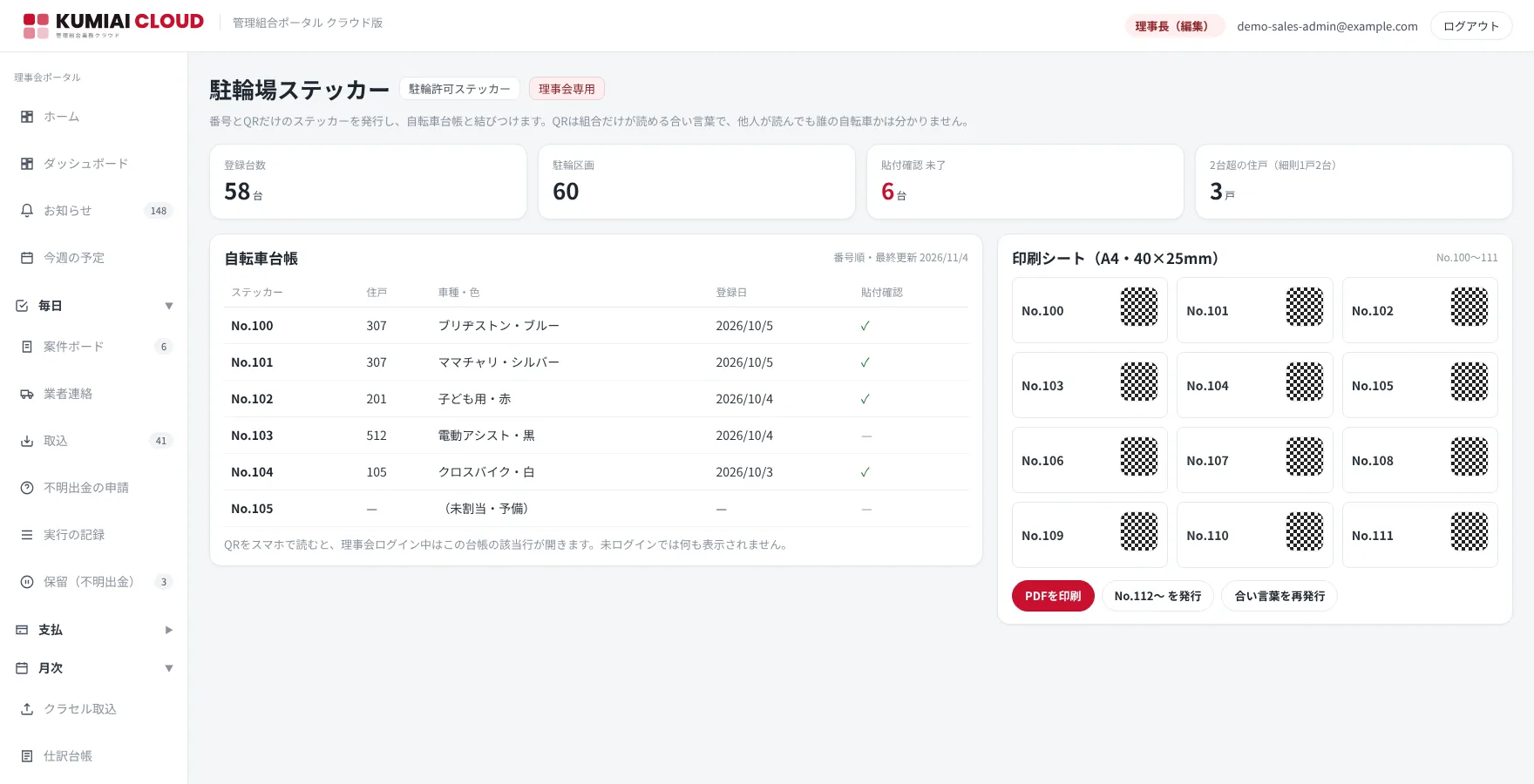
Manage bike parking with stickers that carry only a number and a QR code.
Nobody knows whose bike it is. Application forms and sticker numbers don't match. “Two per unit” can't be counted. — Paper-based bike-parking management breaks down at every association. KUMIAI CLOUD issues stickers that carry only the number the association assigns and a QR code, and links them to the bicycle register.
Privacy Live
Scan the QR and you still can't tell whose it is
The QR code holds a passphrase only the association knows (the same mechanism as the vendor-portal passcode). No unit number or name is inside, so a stranger scanning it just sees a meaningless string. Only when you are logged in as the board does the matching row of the register open.
Issuing and printing Live
Serial numbers from No. 100, printed in a full A4 sheet
The association assigns the numbers (serial per unit, spares included). A PDF with 40 mm × 25 mm stickers tiled on one A4 sheet is printed on ordinary label paper. Reissues and replacements carry the number over.
Register and rules Live
Two-per-unit rule check, sticker confirmation, confirmation letters to each unit
Unit, type, color, registration date and sticker confirmation are kept in the register. Units over the rule's limit (e.g. two per unit) are listed, and a registration confirmation letter is produced for each unit owner. You can bring accurate numbers to the board's resolution on the bike-parking shortage.
The same mechanism works for anything else you manage by number.Motorcycle parking, storage lockers, sheds, fire-extinguisher and equipment inspection sheets — anything you want to manage with “number + QR + register.”
Screens
These are screenshots of the demo environment. In the online demo we walk you through videos and screenshots of the real screens.
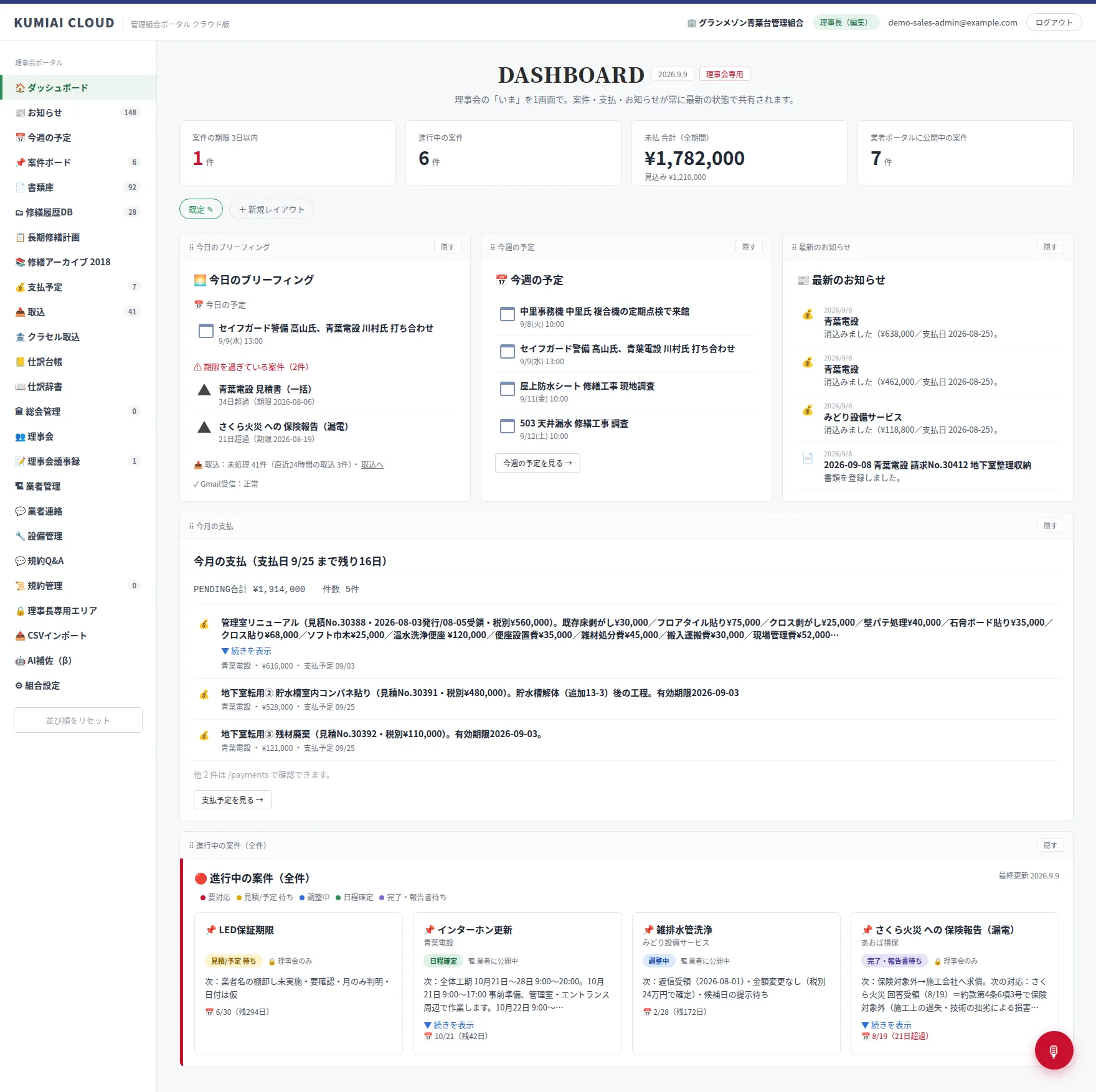
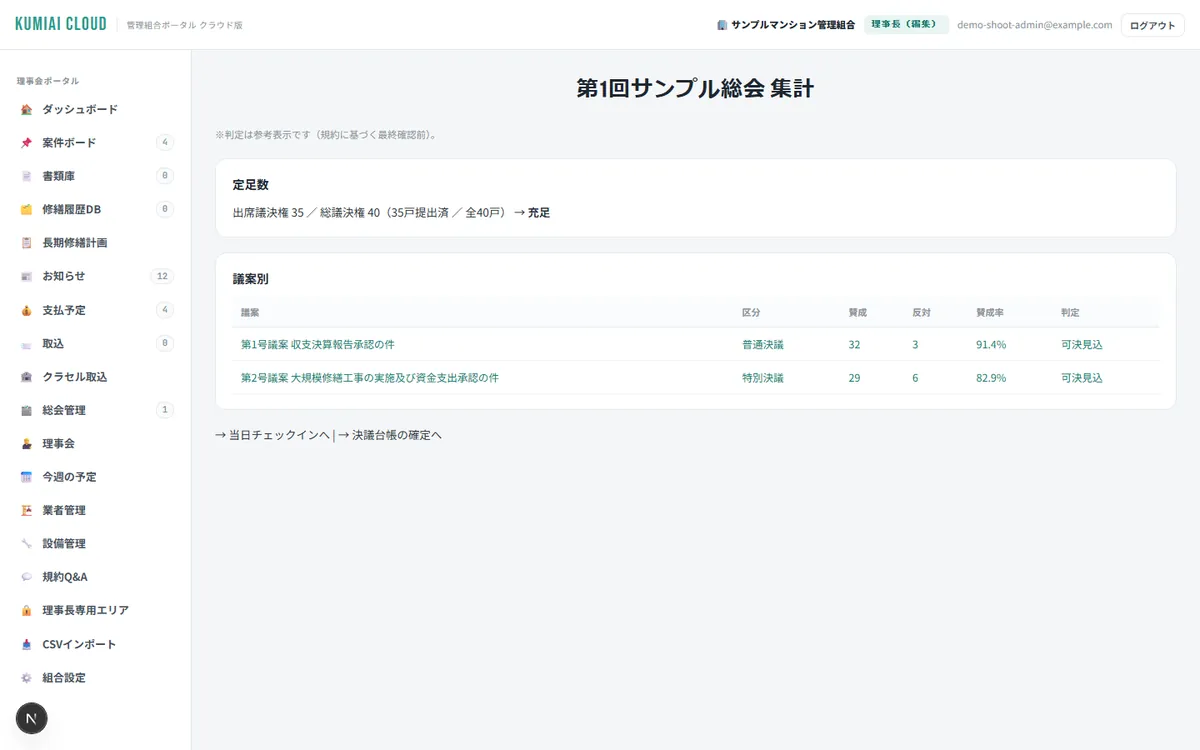
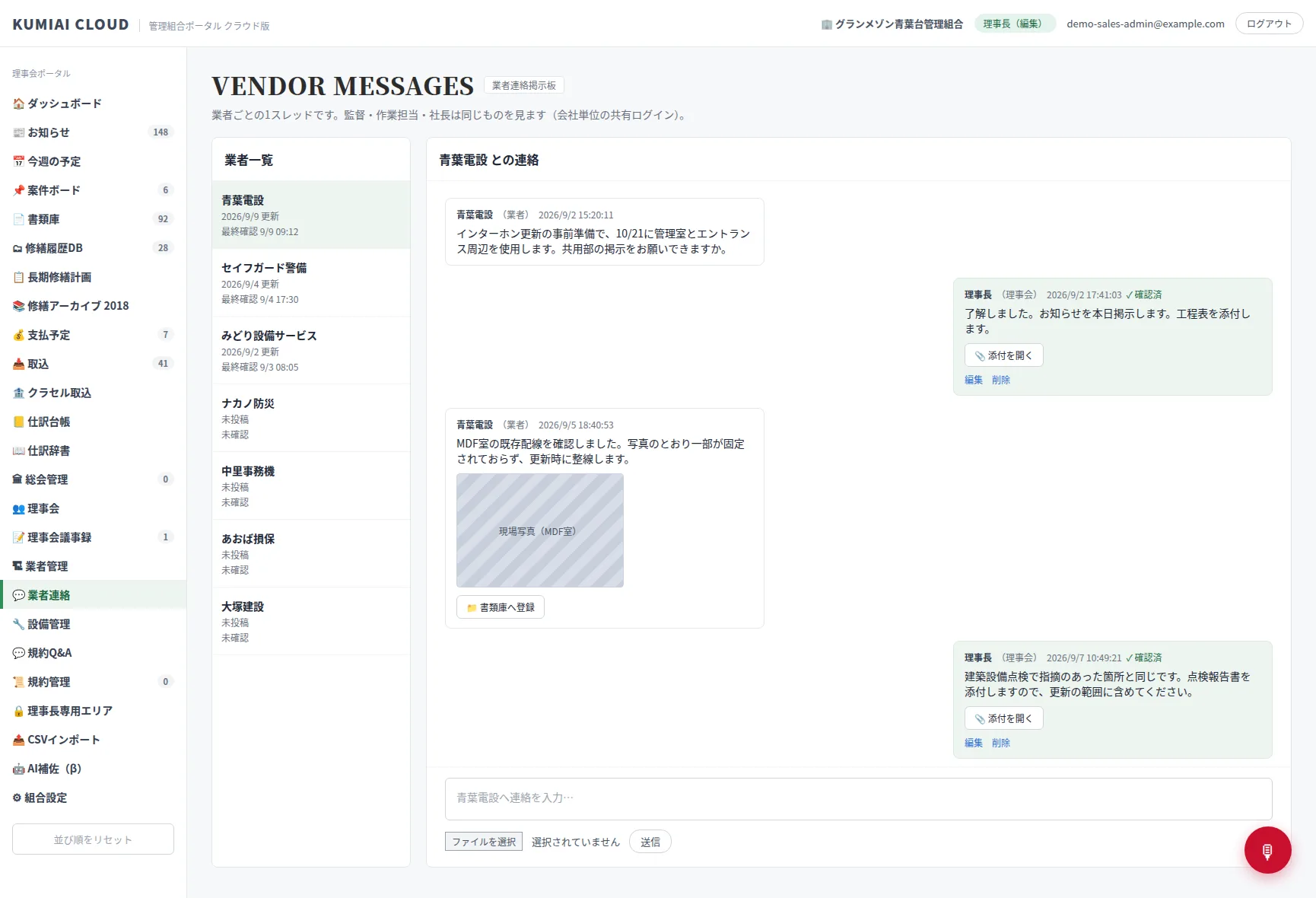
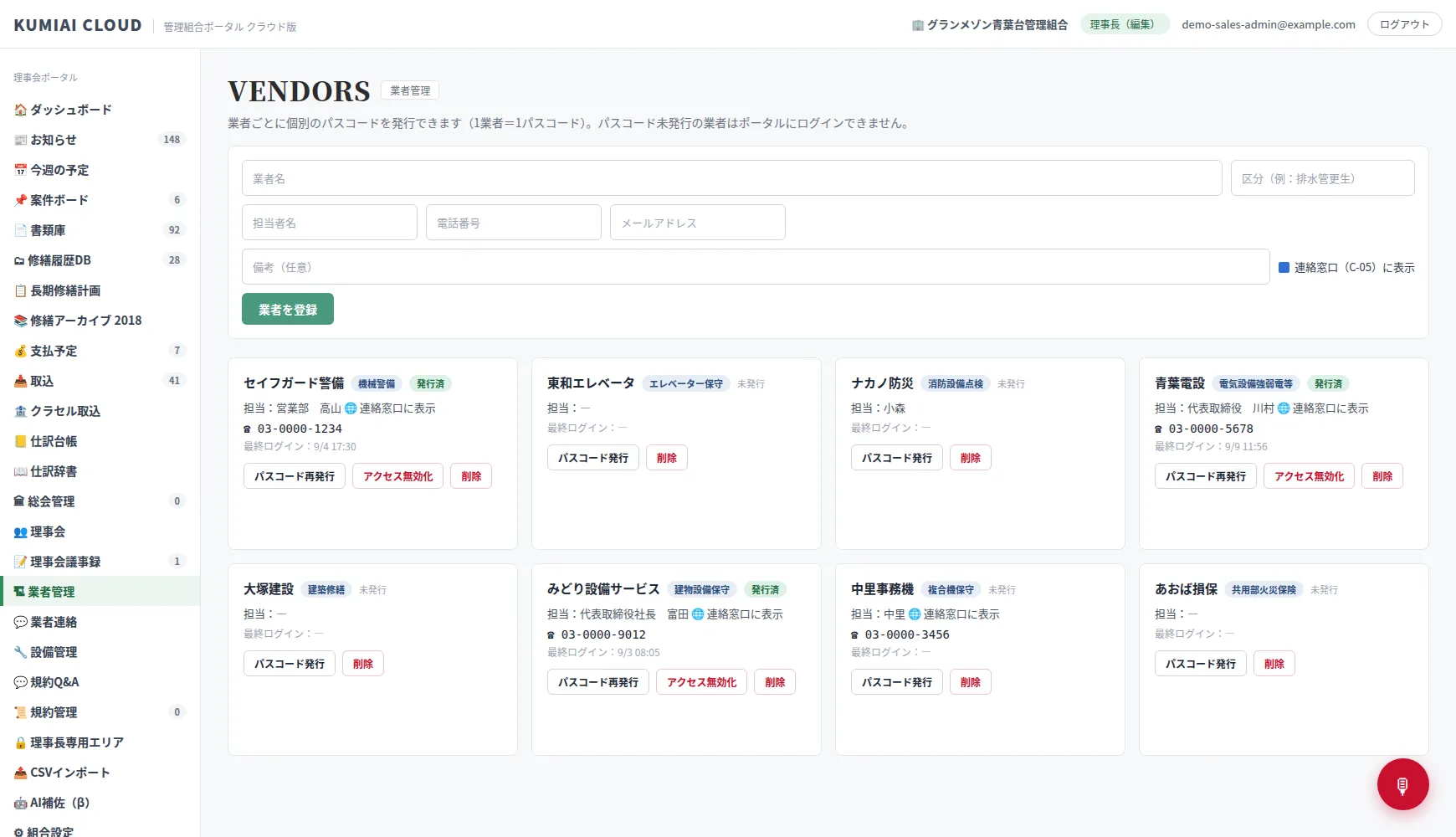
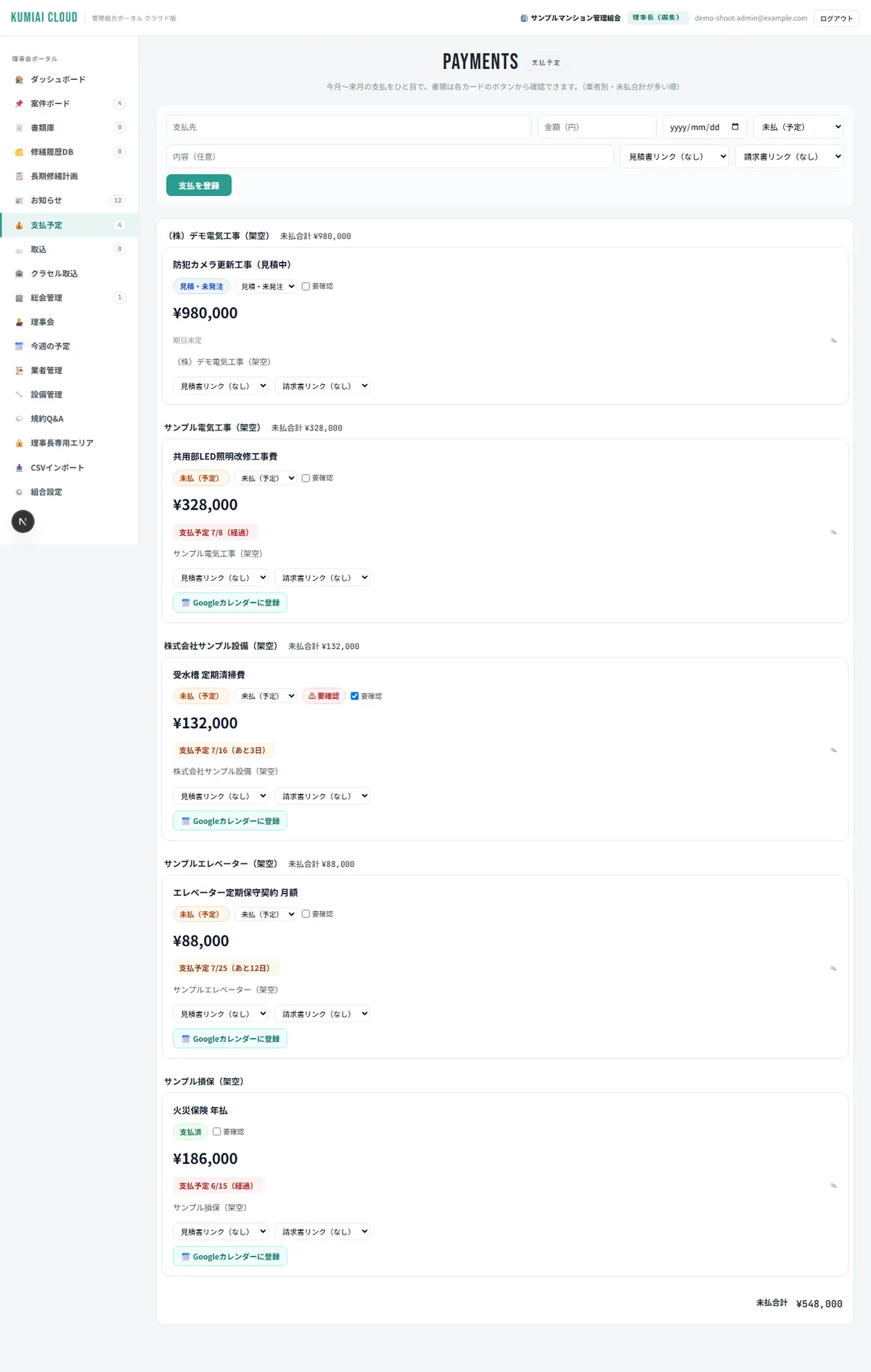
* Screens show demo data. Actual screen designs may change as we improve them.
In an era when “small condominiums being dropped” makes the news,
we have built the answer.
There are growing reports of condominiums — especially those with few units or older buildings — being turned down for contract renewal or hit with steep fee increases because they are not profitable for management companies.
“Keep outsourcing everything, or jump straight into full self-management?” Many associations stall at this either-or. In reality, there is a third way in between:“Hand only part of the administrative work to outside tools and AI, and run the rest through the board.”KUMIAI CLOUD is software that supports that “part” with SaaS and AI. The data belongs to the association; an export feature is planned.
KUMIAI CLOUD was developed by the Board Chair of a 40-unit association in Tokyo. About four and a half years ago he faced the same situation, ended the management contract and moved to full self-management. KUMIAI CLOUD is the result of building, one by one with his own hands, the features he found he “couldn't run without” during that transition. He still runs it at his own association and keeps verifying it while adding features almost every week.
Developer and Board Chair (30+ years old building · 40 units · fully self-managed)
ABOUT
About
A service that brings the work of running a condominium owners' association into one cloud.
Voice AI concierge
Reads real data on cases, schedules, payments and accounts to answer and suggest your next step. Read aloud in a natural voice.
AI bylaws bot
“Can I keep a pet?” “How do I apply for bike parking?” The AI answers instantly from the bylaws and rules, citing the articles.
General meetings · e-voting
From online tallying of votes to quorum checks, all automated. No more counting.
Kurasel import · automatic journal entries
Accounting stays in Kurasel. Import the income-and-expense PDF and the journal dictionary determines the account and the fund.
Vendor portal · message board
One passcode per vendor. Schedules, documents and work details confirmed by both sides in chat, with read receipts.
Automatic Gmail import · reminder drafts
Vendor emails fetched every day, attachments into the document library. Reminder drafts for cases whose reports never arrive.
All documents and minutes in one place
From general-meeting agendas to inspection reports, the association's history is stored in the cloud. Search is instant.
Equipment · repair history
Equipment register, repair history and long-term repair plan linked together. The next works, planned ahead.
Permissions · roles
Set what the Chair, auditor, members and vendors can each see. Transparency and security together.
Five reasons to choose KUMIAI CLOUD
Built by a serving Board Chair, so it fits real life
The developer is himself the Board Chair of a 40-unit association. This is “software by an insider,” polished by daily use at his own association rather than designed at a desk.
Self-managed, management company or consultant — all fine
Designed to work under self-management, a management company or a consultant. The data belongs to the association; an export feature is planned.
Your association's history builds up as an asset
Minutes, accounts, repair history and vendor exchanges accumulate year after year, so handovers are painless when officers change.
From ¥300 per unit per month
For a 40-unit association, from ¥12,000 a month. A small slice of what you save by reviewing management fees digitizes the whole association.
The AI takes on the officers' “hassle”
Bylaw inquiries, document searches, meeting tallies, journal entries, the morning plan. The AI takes over the “effort” that is the biggest reason nobody wants to be an officer.
How is it different from other tools?
Does it stop at “sharing board information,” or does it reach “general meetings, accounting, repairs, vendors and AI”? The range of work covered is different. And in KUMIAI CLOUD the AI goes as far as toread, judge and act — right up to applications and drafts— and that is already built.★marks features that, to our knowledge, no other Japanese tool for condominium associations offers (as of November 2026, our research).
| Feature | KUMIAI CLOUD | Mcloud | Web board service | Manbo | Mansion Mirai Net |
|---|---|---|---|---|---|
| AI that “reads, judges and acts” (unique to KUMIAI CLOUD) | |||||
| Voice AI conciergeSuggests next steps from real data · reads aloud · knows today's date | ★ | × | × | × | × |
| AI bylaws consultationCites the articles · points to application PDFs | ★ | × | × | × | × |
| Today's briefing / this week's and this month's tasksSchedule, overdue items and imports tallied automatically every morning | ★ | × | × | × | × |
| Unidentified withdrawals, one buttonAuto-matched with order emails and Amazon PDF receipts · account set by the journal dictionary · only undecided items put on hold | ★ | × | × | × | × |
| Invoice email → linked to or creates a scheduled payment automaticallyMarked “please check” when the amount comes from a single source | ★ | × | × | × | × |
| Payment applications in Kurasel (agent)Registered automatically · approved with the Chair's ID | ★ | × | × | × | × |
| Kurasel import · automatic journal entries · unrecorded-month alerts | ★ | × | × | × | × |
| Automatic retrieval of year-end statements and the closing tableFetches Kurasel's seven statements · reads, cross-checks and merges them into the meeting agenda in Word | ★ | × | × | × | × |
| Automatic vendor-email import · reminder drafts | ★ | × | × | × | × |
| AI draft of the meeting agenda | ★ | × | × | × | × |
| Home · usability | |||||
| Four home views + four designsSimple / Timeline / Year / Detailed · each Chair picks and saves | ★ | × | × | × | × |
| Smartphone-ready (bottom tabs · one-handed) | ◎ | 〇 | 〇 | ◎ | 〇 |
| Operations | |||||
| QR sticker management for bike parkingNumber + QR + register · unreadable to strangers · bulk assignment · confirmation letters | ★ | × | × | × | × |
| Vendor portalPer-vendor schedules, documents, message board, read receipts, automatic work-schedule notices | ★ | × | × | × | × |
| Accounting · scheduled payments | ◎ | × | × | × | × |
| Budgeting (draft CSV import) · cash flow for three funds · loan repayment table | ◎ | × | × | × | × |
| Long-term repair plan · equipment register · repair history | ◎ | × | × | × | × |
| Permissions · roles / activity logSupports transparency under third-party management | ◎ | × | × | × | × |
| General meetings · voting · members | |||||
| Electronic yes/no votes / change after voting | ◎ | 〇 | ◎ | × | △ |
| Voting entry chosen per meeting (portal / QR) · mixed paper and online tallyProxy votes handled · the later registration wins | ★ | × | × | × | × |
| Per-unit QR login · meeting documents published with the unit's watermarkBulk QR reissue · printing paper handouts | ★ | × | × | × | × |
| Automatic quorum and majority checksOrdinary / special resolutions judged automatically | ◎ | × | × | × | × |
| Automatic meeting notices and agendasFull set of documents output at once | ◎ | × | × | × | × |
| MinutesVote counts and attendance filled in automatically | ◎ | 〇 | 〇 | × | × |
| Notices · documents · surveys | |||||
| Notices · all-units noticesCopied from the board's “This week” in one click | ◎ | ◎ | 〇 | ◎ | △ |
| Messages with units (owners' portal) | ◎ | 〇 | × | 〇 | × |
| Schedule (calendar) | ◎ | 〇 | ◎ | ◎ | 〇 |
| Document storage and search (photos and manuals too)Vendor sharing with previews · GPS stripped on save | ◎ | ◎ | 〇 | ◎ | 〇 |
| Resident feedback · charts | In development | ◎ | × | ◎ | × |
| Facility booking | In development | ◎ | × | × | × |
| Security | |||||
| Two-factor authentication (authenticator app) | ◎ | 〇 | × | × | × |
| Row-level permission separation · enforced CSP · no external loadsData separated per association · about 1,900 automated tests | ◎ | × | × | × | × |
| In development (coming soon) — next ★ candidates | |||||
| Arrears reminders (reads failed direct debits, generates reminder letters)A person sends them | In development | × | × | × | × |
| E-approval of minutes (Docusign; signed PDFs imported automatically)The Chair presses send | In development | × | × | × | × |
| Automatic invoice retrieval (sites you must log in to) | In development | × | × | × | × |
| Decide from a photo of a paper receipt (linked to the withdrawal as evidence) | In development | × | × | × | × |
| Hiring tradespeople (the association recruits directly) | In development | × | × | × | × |
| Cost | |||||
| Setup fee | From ¥0 | ¥50,000 | Free (paid edition ¥96,000) | Free | ¥21,000 (registration fee) |
| Usage fee | From ¥300/unit/month | ¥20,000/month | Free (paid edition ¥5,000/month, up to 50 units) | Free | ¥21,000/year (renewal fee) |
★= a feature with no equivalent elsewhere (the AI reads, judges and acts, up to applications and drafts; to our knowledge no other Japanese tool for condominium associations has it, November 2026) ◎ = standard feature 〇 = possible by adapting a feature △ = partial × = not supported In development = planned
* Based on each company's public information and a third-party feature comparison (as of November 2026, our research). Other companies' features may have changed.
Case study: a 40-unit association in Tokyo
When we moved to full self-management with no management company, my biggest worry was “the information getting scattered.” Now the minutes, payments, general-meeting votes and vendor exchanges are all on one screen. In the morning I ask “What's on today?” and it tells me. When officers change, we just hand over this screen. That is the greatest reassurance.
Board Chair (30+ years old building · 40 units · fully self-managed)
* This association is the proving ground where the developer serves as Board Chair. If you are considering KUMIAI CLOUD, we will walk you through videos and screenshots of the real screens.
Pricing plans
Simple monthly pricing by number of units. We are also happy to discuss setup costs.
Lite
- All documents and minutes in one place
- Board notices · message board
- General meetings · e-voting
- Today's briefing
Standard
- Everything in Lite
- Voice AI concierge
- Bylaws AI (with articles cited)
- Kurasel import · automatic journal entries
- Automatic Gmail import · reminder drafts
- Long-term repair plan · equipment register
Professional
- Everything in Standard
- Vendor portal (schedules, documents, message board)
- Audit log and permission separation for third-party management
- Evidence preservation (tamper-proof, hash records)
We are taking pre-registrations for monitor associations.
We will contact you when applications open. Use the Standard plan free for six months; in return for your feedback on usability, onboarding support is also free.
Getting started
Once applications open, you can be up and running as soon as one month after contacting us.
Brochure · online demo
We explain the features with videos and screenshots of the real screens. Three minutes gives you what you need to decide.
Interview
We ask about how your association is run (self-managed / management company / consultant) and what troubles you now.
Data migration and bylaw digitization
We import minutes and rosters from paper and Excel and load your bylaws into the AI for you. We have a proven migration procedure.
Go live
We hold a briefing for your officers. After launch, the developer himself keeps supporting you.
“Would it work for our association?”
Start by seeing the real thing in action.
We show you videos and screenshots of the real screens online in three minutes. You can also try the voice concierge on the spot.
See the real screens Free brochure